A client says they need a 30-page WordPress website.
What does that tell you?
It tells you there may be around 30 published URLs.
It does not tell you whether the project requires three reusable layouts or 25 unique ones. It does not tell you whether those pages are manually built, generated from structured content, populated from a migration, connected to a CRM, filtered by taxonomy, translated into three languages, or carrying custom interactive behavior.
That is why the page count vs template count WordPress question matters so much in agency estimating.
Page count is easy to understand, easy to put in a proposal, and easy for a client to approve. It is also one of the quickest ways to create a misleading WordPress project estimate when it is used alone.
Template count gets closer to the actual design and development work. WordPress itself is built around reusable templates. The official WordPress Template Hierarchy documentation describes templates as reusable structures that WordPress selects according to the type of page being requested. A single template can therefore serve many URLs.
But even “quote by template count” is incomplete.
A strong agency estimate needs at least five separate scope units:
- Pages — how many content entries or URLs exist.
- Templates — how many structurally distinct page layouts must be built.
- Patterns/components — how many reusable sections or interface elements require design and development.
- Content types/data structures — how content is modeled and managed in WordPress.
- Functionality — what the site actually does beyond displaying content.
When these are mixed together, the quote becomes guesswork. When they are separated, a sitemap starts turning into a delivery plan.
What is the difference between page count and template count in WordPress?
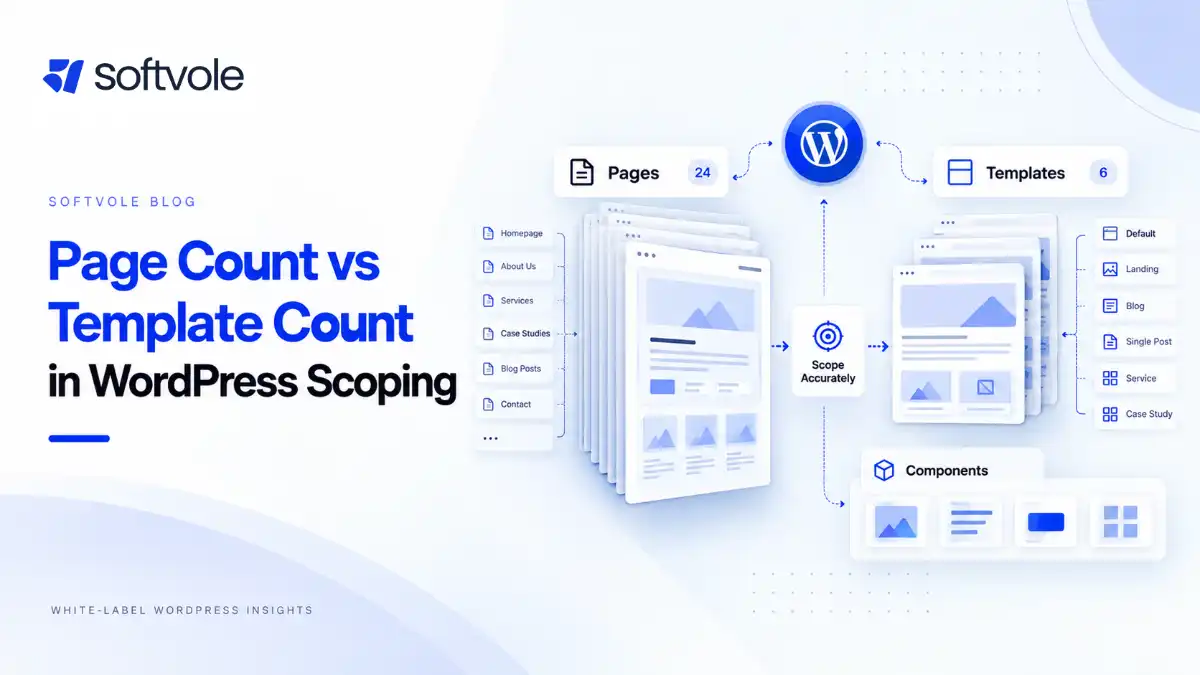
Page count is the number of individual pages, posts, products, case studies, locations, or other URLs that will exist. Template count is the number of distinct layouts or structural systems used to render those entries.
A 50-page service website might use:
- 1 homepage template;
- 1 standard content template;
- 1 service template;
- 1 service archive;
- 1 case study template;
- 1 contact layout.
That is 50 pages or entries, but perhaps only six primary templates.
WordPress supports this separation natively. According to the WordPress Templates documentation, templates represent the underlying structure used to present content. The Site Editor documentation similarly explains that templates define layouts for different sections or page types, while template parts can be reused for global areas such as headers and footers.
For agency scoping, that distinction is commercial, not merely technical.
Every unique template can introduce:
- new layout decisions;
- new responsive behavior;
- new CMS requirements;
- new component combinations;
- new edge cases;
- additional QA.
Every additional page using an already-built template may still require work, but it is often a different kind of work: content population, migration, review, metadata, redirect mapping, and QA rather than new front-end architecture.
That is the core page count vs template count distinction.
Why page count alone creates weak WordPress estimates
A page total collapses several different types of work into one number.
Imagine two hypothetical projects.
Project A
- 40 published pages
- 5 unique templates
- reusable service-page structure
- standard WordPress content
- one contact form
- client supplies final copy
- no major integrations
Project B
- 12 published pages
- 10 unique templates
- custom pricing comparison
- interactive calculator
- gated resource area
- CRM integration
- several custom content relationships
Project A has more than three times the pages.
Project B can still require more design, development, technical QA, and project management.
Nothing about that comparison requires a universal hourly benchmark or fabricated pricing rule. The work units are simply different.
Current 2026 scoping articles make the same broad observation. For example, recent guides from Monk Creatives and LOW/CODE both distinguish raw page count from unique templates when estimating website work.
The useful next question is: what should an agency count instead?
Page count still matters. It just measures different work.
The answer is not to stop counting pages.
That creates a different estimating problem.
A site containing 800 migrated articles and a site containing eight pages may use the same blog template, but they do not have the same migration, content QA, metadata, redirect, or publishing workload.
Page count matters when the work scales per content entry.
Typical examples include:
- manual content population;
- copyediting;
- image selection and cropping;
- alt-text entry;
- metadata population;
- redirect mapping;
- migration cleanup;
- internal-link updates;
- translation;
- page-by-page stakeholder review;
- page-level SEO checks;
- visual QA of migrated content;
- checking downloadable files;
- updating old embeds.
So the right question is not:
Should we estimate by pages or templates?
It is:
Which parts of this project scale by page, which scale by template, and which scale by something else?
That is a much more useful page count vs template count WordPress framework.
The six-unit WordPress scoping model
For agency work, use six separate counters.
| Scope unit | What it measures | Typical work it predicts |
|---|---|---|
| Pages / entries | Published URLs or content records | Population, migration, metadata, redirects, page-level QA |
| Unique templates | Structurally distinct page layouts | Design, front-end build, responsive behavior, template QA |
| Reusable patterns / components | Repeated sections and UI elements | Design-system work, block/component development, interaction states |
| Content types | Distinct CMS-managed entities | Data modeling, custom fields, taxonomies, editor workflows |
| Functions / integrations | Behaviors and external connections | Development logic, API work, testing, failure states |
| Special states / journeys | Non-default states and multi-step flows | QA, accessibility, validation, error handling, UX logic |
This is the main estimating framework for the article.
It prevents an agency from treating “20 pages” as if those 20 pages were the only work product.
1. Pages / entries
Count the actual content inventory.
Depending on the project, that could include:
- pages;
- blog posts;
- products;
- case studies;
- team members;
- jobs;
- locations;
- events;
- resources;
- testimonials;
- documentation articles.
This number is especially important for migration and content population.
2. Unique templates
Count every layout that requires meaningfully different structure or behavior.
Typical examples:
- homepage;
- standard content page;
- service detail;
- service archive;
- industry detail;
- case study archive;
- case study single;
- blog archive;
- blog post;
- author archive;
- search results;
- 404;
- contact;
- campaign landing page;
- product archive;
- product detail.
WordPress uses its template hierarchy to determine which template should render different query types. Your agency’s commercial “template count” does not need to map one-to-one to PHP or block-theme filenames, but the WordPress concept helps explain why repeated content does not necessarily equal repeated development.
3. Reusable patterns and components
Templates are still too large a unit for some projects.
A single service template may contain:
- hero;
- logo strip;
- proof/statistics section;
- service-navigation component;
- testimonial block;
- FAQ;
- pricing block;
- CTA;
- related-case-study grid.
Some of those may be reused on six other templates.
WordPress calls reusable block compositions patterns. The official WordPress Patterns documentation describes patterns as preconfigured groups of blocks that can be reused.
Whether your build uses Gutenberg patterns, Elementor widgets, ACF-driven components, theme parts, or custom blocks, the scoping principle is the same:
Count a component once when it is genuinely reusable, then separately count the places where it requires unique behavior.
4. Content types
Page count can hide CMS architecture.
A “40-page site” may actually contain:
- 10 normal pages;
- 12 services;
- 8 case studies;
- 10 locations.
Those are not merely four visual groups. They may need different editing interfaces, custom fields, taxonomies, archive behavior, URL rules, and relationships.
WordPress supports custom post types for distinct content entities. Its Plugin Handbook recommends registering custom post types in plugin-level functionality when the content should remain portable if the theme changes.
For scoping, list each content type and document:
- fields;
- taxonomies;
- required/optional values;
- archive behavior;
- relationships;
- filters;
- editor permissions;
- template assignment.
5. Functions and integrations
A template count cannot describe a calculator, CRM connection, booking system, membership workflow, or advanced filter.
Functions should be estimated as their own work units.
Examples:
- multi-step forms;
- conditional forms;
- faceted filtering;
- search;
- calculators;
- pricing configurators;
- booking;
- gated downloads;
- membership;
- login/account flows;
- HubSpot integration;
- Salesforce integration;
- GoHighLevel integration;
- payment gateway;
- inventory sync;
- external API;
- newsletter automation.
A five-template site with substantial custom functionality can be a larger engineering project than a 15-template brochure site.
6. States and journeys
Static design files often show only the successful state.
Real websites also have:
- empty results;
- loading;
- error;
- success;
- validation;
- logged-in/logged-out;
- in-stock/out-of-stock;
- active/inactive;
- selected/unselected;
- expanded/collapsed.
A “form template” that includes five conditional branches and several integration outcomes has more testing and UX work than a static contact layout.
For complex work, count critical journeys as well as templates.
A page-template map: the fastest way to scope a sitemap
Once you have the page inventory, assign every entry to a template group.
Here is a hypothetical example.
| Page / content group | Approx. entries | Template | Special notes |
|---|---|---|---|
| Home | 1 | Home | Unique layout |
| About | 1 | Standard content | Team component |
| Services overview | 1 | Service archive | Service grid |
| Individual services | 12 | Service detail | Structured fields |
| Industries | 6 | Industry detail | Similar component system, distinct layout |
| Case studies | 10 | Case study single | Custom fields + related services |
| Case study index | 1 | Case study archive | Filters |
| Blog posts | 35 | Blog single | Migrated content |
| Blog index | 1 | Blog archive | Pagination/categories |
| Contact | 1 | Contact | CRM-connected form |
| Privacy / terms | 2 | Legal / standard | Minimal variation |
Published entries: 71.
Commercial template groups: perhaps nine.
But the estimate should not stop there. The case-study filter, CRM form integration, migration of 35 posts, custom case-study fields, and content population still need separate lines.
This is why page count vs template count WordPress scoping should produce a map, not just two numbers.
How do you decide whether two pages share one template?
Two pages share a template when the underlying structure, content model, and responsive behavior are reusable without substantial page-specific implementation.
That definition is more useful than asking whether they “look similar.”
Use these five tests.
Test 1: Structure
Do the pages use the same section order and hierarchy?
If one service page has:
Hero → Benefits → Process → FAQ → CTA
and another has:
Hero → Calculator → Comparison → Case studies → Pricing → FAQ → Form
they may belong to different template families even if their typography is identical.
Test 2: CMS model
Do editors manage the same kinds of fields?
If every location page has:
- address;
- phone;
- opening hours;
- map;
- local services;
- manager;
- local testimonials;
then one structured location template may serve dozens of locations.
Test 3: Component behavior
Do the same components behave the same way?
A hero that only changes text and image is reusable.
A hero that sometimes includes a search interface, video controls, pricing toggle, or conditional form may create a different implementation requirement.
Test 4: Responsive behavior
Does the layout transform in the same way across breakpoints?
Two desktop layouts may look almost identical but require different mobile interaction patterns.
Test 5: Exceptions
How many exceptions are being added?
A template with one optional section is still a template.
A template with 14 page-specific exceptions may be a disguised collection of bespoke pages.
At some point, forcing every page into one “flexible template” increases complexity rather than reducing it.
Do not confuse a flexible page builder with one template
This mistake appears often in Elementor, Gutenberg, Bricks, Divi, and other visual-builder projects.
An agency may say:
Everything uses one page template because every page is built in Elementor.
Technically, perhaps.
Commercially, that can be meaningless.
If 15 pages are individually designed and assembled with different section structures, they still require 15 sets of layout decisions, responsive work, review, and QA even if WordPress technically renders them through the same generic canvas.
The quote should reflect design and implementation uniqueness, not only the template filename that WordPress loads.
Likewise, building one enormous “flexible template” containing dozens of conditional layouts does not magically make the work one template.
It may simply move complexity from templates into conditional logic.
Template count vs pattern count
This distinction is particularly useful for component-based WordPress builds.
Suppose an agency designs:
- 8 unique page templates;
- 18 reusable content patterns;
- 6 global components;
- 3 interactive components.
The templates define page-level structure.
The patterns define repeatable content sections.
The global components define site-wide elements such as the header or CTA.
The interactive components carry functional behavior.
That scope is far more informative than “32 pages.”
The current WordPress Site Editor makes this architectural distinction visible. WordPress documentation separates templates from reusable template parts and patterns, reinforcing the idea that site-wide structure can be assembled from reusable systems rather than duplicated page by page.
For estimates, count these separately.
The Template Uniqueness Score
When a sitemap contains ambiguous page types, use a simple scoring method.
Score each proposed page family from 0 to 2 across five dimensions:
- Structure
- CMS fields
- Component behavior
- Responsive behavior
- Special states / logic
Use:
0= same as an existing template1= small extension or optional variation2= materially different
| Total | Scoping decision |
|---|---|
| 0–2 | Reuse existing template |
| 3–5 | Reuse template with documented variant |
| 6–8 | Likely separate template or major component variant |
| 9–10 | Treat as a unique template / flow |
This is an editorial framework, not an industry standard.
Its purpose is to force the estimating team to explain why a page is or is not unique.
Example
A new “Enterprise Service” page differs from the standard service template:
- Structure: 2
- CMS fields: 1
- Component behavior: 2
- Responsive behavior: 1
- Special logic: 0
Total: 6.
Instead of quietly squeezing it into “Service template,” the team should probably estimate it as a separate template or a substantial template variant.
That decision becomes visible before production.
When a template variant should be counted separately
Not every variation deserves its own template line.
Common optional variations can stay inside a reusable system:
- hero with or without eyebrow;
- section with optional image;
- CTA with two style choices;
- testimonial present or absent;
- sidebar enabled or disabled.
Consider a separate template or major variant when the change affects:
- information architecture;
- CMS fields;
- responsive layout;
- interaction model;
- user journey;
- permissions;
- business logic;
- integration behavior;
- QA approach.
For agency quoting, the distinction should follow work, not terminology.
How page count affects migration scope
Migration is where page count becomes important again.
A site may have only six templates but hundreds of content records.
Before estimating migration, classify every content group.
| Content group | Quantity | Migration method | Cleanup required? | Redirect impact |
|---|---|---|---|---|
| Pages | 20 | Manual / import | Moderate | Some |
| Blog posts | 180 | Automated | Formatting cleanup | Low |
| Case studies | 35 | Transform into CPT | High | Yes |
| Team members | 16 | Manual / structured | Low | No |
| PDFs | 70 | Media migration | Metadata review | Possibly |
Do not hide this inside template count.
Migration work may include:
- extracting data;
- mapping source fields;
- transforming HTML;
- rebuilding shortcodes;
- remapping media;
- cleaning broken formatting;
- retaining dates/authors;
- migrating SEO metadata;
- validating URLs;
- creating redirects;
- checking internal links;
- reviewing output.
A 200-post migration is not “one blog template.”
It is one template plus 200 records that need an appropriate migration process.
How page count affects QA scope
The same logic applies to QA.
Template-level QA checks the reusable system:
- layout;
- responsiveness;
- accessibility behavior;
- CMS output;
- components;
- interactions.
Page-level QA checks the populated instance:
- missing content;
- wrong images;
- broken internal links;
- metadata;
- formatting;
- content overflow;
- unique embeds;
- redirects.
If 100 pages share one template, you do not need to rediscover the template architecture 100 times.
But you may still need page-level content validation across those 100 entries.
This is why agencies should scope template QA and content QA separately.
For a deeper pre-handoff process, Softvole’s WordPress delivery guides can be used alongside your internal QA checklist rather than treating “responsive testing” as a single line item.
How functionality changes the estimate even when templates stay the same
A service page may use one visual template across 20 services.
Then one service requires an eligibility calculator.
Another requires a booking flow.
Another embeds a location finder.
The page count has not changed.
The template count may not even need to change.
The functionality count has.
This is why the page count vs template count WordPress model needs a third axis: behavior.
For each function, document:
- trigger;
- inputs;
- output;
- validation;
- integrations;
- user roles;
- error state;
- success state;
- analytics event;
- admin workflow.
Now the estimate reflects what the site does, not only what it looks like.
WordPress content types can reduce page-by-page work
Structured content is one of WordPress’s strongest advantages for repeated page families.
Suppose an agency needs 60 location pages.
Instead of designing and manually assembling 60 pages, the team might create:
- a Location custom post type;
- location fields;
- location taxonomy;
- one single-location template;
- one location archive;
- reusable CTA/pattern system.
WordPress’s custom post type documentation describes custom post types as a way to create distinct content types with their own administrative interface.
This can reduce repeated layout work and make editing more consistent.
But structured content introduces its own scope:
- content modeling;
- field setup;
- taxonomy;
- migration;
- editor UX;
- archive behavior;
- relationships;
- filters;
- template logic.
Do not treat CMS architecture as “free” because it reduces the page-by-page build.
What about landing pages that are intentionally unique?
Some projects genuinely need bespoke pages.
Campaign landing pages may differ because of:
- audience;
- offer;
- traffic source;
- conversion mechanism;
- experimentation;
- content hierarchy.
Brand-heavy sites may intentionally give every major page a different composition.
That is not bad scoping.
The mistake is pretending those pages are the same scope as repeated content templates.
If five landing pages have five distinct structures, count five unique layouts.
If ten campaign pages use one approved landing-page system with interchangeable sections, count the system plus the population/variant work.
The correct number depends on implementation reality.
How to estimate a WordPress project from a sitemap
Here is a practical agency process.
Step 1: Inventory every URL or planned content entry
For redesigns, crawl the current site and export the relevant URL set.
For new projects, use the sitemap or content plan.
Mark each entry:
- keep;
- remove;
- merge;
- redirect;
- create;
- migrate.
Step 2: Group pages by structural family
Examples:
- standard pages;
- services;
- industries;
- locations;
- case studies;
- blog;
- resources;
- team;
- contact;
- landing pages.
Do not decide template count from page names alone. Open representative examples.
Step 3: Identify unique template structures
For each family, define:
- layout;
- responsive behavior;
- editable fields;
- optional sections;
- archive/listing;
- filters;
- navigation behavior.
Step 4: Inventory reusable patterns and components
Create a component list.
Examples:
- header;
- footer;
- hero;
- logo wall;
- testimonials;
- CTA;
- FAQ;
- pricing table;
- cards;
- comparison table;
- filters;
- forms;
- modal;
- tabs;
- accordion.
Step 5: Map CMS content types
List:
- Pages
- Posts
- Products
- Services
- Case Studies
- Locations
- Team Members
- Events
- Resources
Then define fields and relationships.
Step 6: Separate functionality
List every behavior that needs more than static rendering.
Do not hide “small” functions inside templates.
Step 7: Count migration and population work
For each content group, record:
- quantity;
- source;
- migration method;
- cleanup;
- image handling;
- metadata handling;
- redirect impact.
Step 8: Define QA units
Estimate:
- template QA;
- component QA;
- functional QA;
- integration QA;
- content QA;
- migration validation.
Step 9: Write assumptions into the quote
A quote should be able to say something like:
Includes 7 unique responsive templates, 12 reusable components, 3 structured WordPress content types, one contact-form integration, and population of up to 25 supplied pages. Existing blog migration and additional landing-page templates are excluded unless added through change control.
That is much safer than:
25-page WordPress website.
Step 10: Price from the scope units
Your internal estimating model may use hours, points, historical project data, fixed production units, or another method.
The methodology is less important than the inputs.
The estimate should know what is being counted.
A scope table agencies can use before quoting
Use this table before approving a fixed-price estimate.
| Scope area | Count | Defined? | Main owner | Estimate impact |
|---|---|---|---|---|
| Published pages / entries | Yes / No | Content / migration / QA | ||
| Unique templates | Yes / No | Design / development | ||
| Template variants | Yes / No | Design / responsive / QA | ||
| Reusable components | Yes / No | System build | ||
| Interactive components | Yes / No | Development / QA | ||
| Custom post types | Yes / No | CMS architecture | ||
| Taxonomies | Yes / No | CMS / filtering | ||
| Integrations | Yes / No | Development / testing | ||
| Forms / workflows | Yes / No | Logic / notifications | ||
| Migrated records | Yes / No | Migration / cleanup | ||
| Redirects | Yes / No | SEO / launch | ||
| Languages | Yes / No | Content / templates / QA | ||
| Critical user journeys | Yes / No | UX / functional QA |
If several high-impact rows still say “No,” the project may need discovery before a fixed quote.
What agencies get wrong about page count vs template count
Mistake 1: Treating every URL as a unique design
This inflates design and development scope for structured websites.
Group repeated content before estimating.
Mistake 2: Treating every URL as “just another page”
The opposite mistake is just as expensive.
A pricing calculator, member dashboard, product configurator, or advanced landing page is not equivalent to a standard content page because both have URLs.
Mistake 3: Counting template files instead of delivery complexity
A page builder can technically render many bespoke pages through one WordPress page template.
That does not make them one design/build unit.
Mistake 4: Ignoring reusable components
Agencies sometimes quote eight templates and then discover 30 custom sections that all need design, responsive behavior, CMS controls, and QA.
Count the system below the page level.
Mistake 5: Ignoring content types
A “case studies section” may mean a custom post type, fields, taxonomy, archive, single template, filters, and related-content logic.
The visual template is only part of the work.
Mistake 6: Treating page population as free because the template exists
Once a template is built, additional entries may be cheaper to produce, but they still require time if the agency is responsible for entering, cleaning, formatting, linking, or reviewing the content.
Mistake 7: Ignoring migration volume
One blog template can contain 600 posts.
Your template estimate may be small while your migration scope is substantial.
Mistake 8: Allowing unlimited exceptions inside a “reusable” template
If every page requires custom CSS, conditional fields, or unique section structures, the template is not delivering the reuse assumed by the quote.
Mistake 9: Counting pages before the content architecture is known
A project may begin as “15 pages” and later become Services, Industries, Locations, Case Studies, Resources, and Team content types.
The architecture changes the estimate.
Mistake 10: Comparing agency quotes using only page count
Two proposals can both say “20-page WordPress website” while describing completely different products.
Compare:
- unique templates;
- component system;
- CMS model;
- functionality;
- migration;
- content responsibilities;
- QA;
- launch scope.
Then compare price.
When page count can be a reasonable estimating shortcut
Not every project needs a multi-axis scoping model.
Page-based estimating can be practical when:
- the project is small;
- every page uses an established system;
- functionality is standard;
- content is final;
- there is no meaningful migration;
- there are no custom integrations;
- revision limits are clear;
- your agency has strong historical data for that exact type of build.
For example, a repeatable five-page brochure website using a proven internal system may not need a complex template analysis.
The shortcut becomes risky when the page count is being used to hide uncertainty.
If the client says “about 25 pages” and nobody has looked at the sitemap, content model, or functionality, the number is not an estimate input yet.
It is a conversation starter.
How to explain template count to a non-technical client
Do not make the client learn WordPress’s template hierarchy.
Use plain language:
“Pages are the individual URLs visitors open. Templates are the reusable layouts behind those pages. If 20 service pages share the same structure, we design and build that core structure once, then populate the individual service content. We therefore scope the reusable template and the page population separately.”
That usually makes sense immediately.
If the client wants a more tailored page, explain the commercial impact:
“This page no longer follows the standard service layout, so we’ll treat it as a separate template or template variant rather than another content page.”
Clear scope language is easier to defend than an unexplained extra fee.
How this changes white-label WordPress handoffs
For agencies using an external production partner, page count vs template count WordPress scoping is especially important because the development team may not have been on the sales calls.
A production brief should not say:
28 pages. Figma attached.
It should say:
- 28 published pages;
- 7 unique templates;
- 4 template variants;
- 14 reusable sections;
- 3 custom post types;
- 2 forms;
- 1 CRM integration;
- 18 pages require content population;
- 10 case studies require migration;
- 22 existing URLs require redirect decisions.
Now the production team can estimate the same project the account team thinks it sold.
Softvole works specifically as an agency-only white-label production partner. Agencies considering outside delivery support can review the Softvole WordPress and WooCommerce services to see where development, migration, ecommerce, and ongoing care can sit behind the agency-client relationship.
The value of the handoff is not the length of the brief.
It is the removal of hidden assumptions.
A practical quote-ready checklist
Before sending the estimate, confirm:
Page inventory
- Planned URLs/content entries are listed
- Existing URLs are inventoried for redesigns
- Keep/remove/merge decisions are known
- Migration volume is known
- Content population responsibility is known
Template inventory
- Homepage counted separately
- Standard content template defined
- Archive/listing templates counted
- Single/detail templates counted
- Search/404 states considered
- Template variants documented
Component system
- Global components listed
- Reusable sections listed
- Interactive components identified
- Optional states defined
- Page-specific exceptions flagged
CMS architecture
- Content types identified
- Custom fields known
- Taxonomies known
- Relationships known
- Editor workflow understood
Functionality
- Forms defined
- Search/filtering defined
- Integrations defined
- Calculators/booking/membership identified
- Error/success states considered
Delivery
- Design responsibility known
- Content responsibility known
- Migration responsibility known
- QA responsibility known
- Launch responsibility known
- Revision boundaries known
If those answers are clear, the page count becomes useful because it now sits inside a complete scope.
Practical next step: turn your sitemap into four columns
You do not need a complicated estimating platform to improve scoping.
Take the sitemap and add four columns:
- Template
- Content type
- Reusable components
- Special functionality
Then tag every URL.
Within 20 minutes, most unclear projects start revealing their actual shape.
You may discover:
- 60 pages but only six templates;
- three “standard” pages that are actually unique landing pages;
- one content type that deserves structured fields;
- a filter that nobody included in the development estimate;
- a large migration hidden inside “blog”;
- five sections that should become reusable patterns.
That exercise turns the abstract page count vs template count WordPress discussion into something the estimating team can use.
If your agency prices from historical data, keep both numbers in your project records. Over time, you can compare actual effort against:
- page volume;
- template count;
- component count;
- content types;
- integrations;
- migration volume.
That is more useful than remembering that “the last 20-page website took six weeks.”
Frequently Asked Questions
Is template count more important than page count for WordPress estimates?
Template count is usually more predictive of design and front-end development work, but page count still matters for content population, migration, metadata, redirects, and page-level QA. A reliable estimate tracks both rather than replacing one with the other.
What counts as a unique WordPress template?
For commercial scoping, count a template as unique when it requires materially different structure, CMS fields, responsive behavior, component behavior, or functional logic. The commercial template count does not need to match the exact number of WordPress template files in the theme.
If 30 service pages use one layout, is that one template?
Usually, yes. The reusable service structure can be one template while the 30 service entries are counted separately for content population, migration, metadata, and QA. If some service pages contain materially different layouts or behavior, document them as variants or separate templates.
Do Gutenberg or Elementor sites still need a template count?
Yes. A visual builder does not remove layout complexity. If every page is individually designed, assembled, made responsive, and tested, those pages can still represent unique design/build work even if WordPress technically renders them through a generic page template.
Should reusable sections be included in the template count?
Track them separately when they require meaningful design or development. Reusable heroes, testimonial blocks, pricing tables, forms, tabs, filters, and CTA systems can be shared across several templates. Counting components separately makes the estimate more transparent.
How should agencies scope custom post types?
Count each content type separately and document its fields, taxonomies, relationships, archive behavior, single template, filters, permissions, and migration requirements. A custom post type is not just another page template; it is part of the CMS architecture.
How should migration be estimated if many pages share one template?
Estimate the template work and migration work separately. Migration should account for record volume, source format, field mapping, content cleanup, media, SEO metadata, redirects, and validation. A single blog template can still contain hundreds of records that need migration work.
What is the easiest way to compare two WordPress quotes?
Compare page count, unique templates, reusable components, CMS/content types, functionality, integrations, migration responsibility, QA, and launch scope. If two quotes only show a page total, you cannot reliably tell whether they describe the same project.
Conclusion
The page count vs template count WordPress distinction solves one of the most common agency estimating problems: confusing the number of URLs with the amount of design and development work.
But template count is not the end of the model.
Pages predict population and migration volume. Templates predict structural design and build effort. Reusable patterns predict component-system work. Content types predict CMS architecture. Functionality predicts engineering and testing. Special states and journeys predict the work hidden between the screenshots.
Scope those separately and a WordPress project becomes much easier to quote, compare, hand off, and defend.
For agencies that want to keep strategy, design, SEO, and client ownership in-house while moving WordPress production behind the scenes, Softvole can work as a white-label production partner. The cleanest starting point is a brief that tells the production team not just how many pages exist, but what actually has to be built.